Below are a host of frequently asked questions. Simply click on the query that best suits the issue you're experiencing to access our recommended solution.
Your Account
- How do I become a Member of the Half Yard Sewing Club?
- How much does the Half Yard Sewing Club cost?
- I have a Free Trial code. How do I use it?
- Can I buy a Gift Subscription?
- How do I refer a friend to join the Half Yard Sewing Club?
- I want to update my payment details; how do I do that?
- How do I change my subscription type?
- How do I change my password?
- I've forgotten my password and I haven't received the reset email. What should I do?
- I want to cancel my account; how do I do that?
- I am having problems with the website or my account; what should I do?
- I’ve been charged unexpectedly. What should I do?
Projects & Patterns
- How do I download and print the project instructions?
- How do I download and print the project pattern/template?
- How do I print out A4 or US Letter patterns at home?
- I have a sewing question; who can I ask?
- I want to show other members what I've made; how do I do that?
- Can I sell the projects I make from the instructions on the website?
Digital Magazine
Discounts & Offers
Livestreams & Events
Redeeming Codes for Yearly Subscription (From Sewing Street etc.)
- I haven't received my code yet; what should I do?
- I'm NEW to the Half Yard Sewing Club, how do I redeem my subscription?
- I have a CANCELLED/REGISTERED account; how do I redeem my subscription?
- I already have a PAID MONTHLY/ANNUAL subscription; how do I redeem my subscription?
- Do I need to cancel my subscription before using any membership codes?
- I'm already on a TRIAL/GIFT/RESELLER code membership, how do I redeem my subscription?
- I have tried to redeem my code, but I have been charged for a monthly/yearly subscription; what should I do?
- I have completed my subscription, but the page is stuck on the 'please wait' screen; what should I do?
Purchase Extras (AKA Loyalty codes)
- How do I access a purchase extra/loyalty discount?
- Can I switch from monthly to annual membership using the loyalty code?
- What happens if I use the add-on before my current membership expires?
- My membership end date looks incorrect after renewing.
- Can I purchase more than one purchase extra?
- Do I need to cancel my subscription before using any membership codes?
- I’ve been charged unexpectedly. What should I do?
Troubleshooting
- I haven't received my newsletter! What do I do?
- Get in touch! If the answer to your query isn’t here, try contacting us via email.
How do I become a member of the Half Yard Sewing Club?
Joining the Half Yard Sewing Club is quick and easy. Just click ‘Become a Member’ at the top of the homepage, create your account by entering your email address and chosen password, complete our secure online payment process, and you will get instant access to all your membership features.
Don't forget to sign up for our newsletter!
How much does the Half Yard Sewing Club cost?
The Half Yard Sewing Club costs £7.99 a month including tax, or you can get two months free by buying a year’s membership for £80 including tax. The payment will repeat automatically every month or year depending on your subscription, unless you cancel your account.
I have a Free Trial code. How do I use it?
Free Trial codes can be applied when you join the Half Yard Sewing Club. Just click ‘Become a Member’ at the top of the homepage, create your account by entering your email address and chosen password, add your Trial Code into the coupon code box beneath your address and select ‘Apply’. Complete our secure online payment process and you will get instant access to all your membership features.
Note: When your free trial has expired your subscription will continue, and payment will be taken automatically every month or year depending on your subscription, unless you cancel your account.
Can I buy a Gift Subscription?
Yes you can! Gift Subscriptions are available from the website. You can buy to the value of 3, 6, or 12 months, and you will receive a unique gift certificate via email to send to your loved one. Please find the details here and contact info@halfyardsewingclub.com if you have any further questions.
How do I refer a friend to join the Half Yard Sewing Club?
Refer a friend, and when they join you can download a FREE Half Yard Sewing Club ebook Debbie Shore’s Craft Collection! Your friend will recieve a free two month trial!
All you need to do is complete the form at www.halfyardsewingclub.com/refer-a-friend to refer them. When they subscribe, the code to download the exclusive ebook will be sent to you.
Note: When the free trial has expired the subscription will continue, and payment will be taken automatically every month, unless you cancel your account.
Can I sell the projects I make from the instructions on the website?
We are always happy for you to sell your makes for charity, or to give them as gifts. Debbie is also happy for you to sell your makes based on her designs for profit, as long as it is on a small scale and not mass produced. You can email info@halfyardsewingclub.com, or contact Debbie’s publishers at Search Press for more information.
I want to update my payment details; how do I do that?
If you need to change your payment details for any reason, you can do this through the tab on 'My Account' on the home page.
How do I change my subscription type?
To change your subscription type sign in, navigate to ‘My Account’ and select the ‘Manage my subscription’ button. Your current plan will be stated alongside a ‘Change’ button. Select ‘change’ and you will have the option to switch to an annual plan.
Select the ‘Change plan’ button and you’re all done!
Note: The new subscription will start immediately, and we will take off the remaining part of your monthly payment from your new subscription.
How do I change my password?
- If you have forgotten your password, click the ‘Forgot your password?’ link on the ‘Sign in’ screen.
- Enter your email address and you will be sent an email containing a link that will allow you to reset your password. Make sure to check your junk folder for this email if it doesn’t appear in your inbox.
- To update your password, sign in with your current password and navigate to ‘My Account’, then select the ‘Change my password’ option and follow the onscreen instructions.
I’ve forgotten my password and I haven’t received the reset email. What should I do?
Sometimes our system emails can make their way into spam inboxes. Double check you junk folder and if your email isn’t there simply contact us at info@halfyardsewingclub.com and one of the team will reset your password for you.
I want to cancel my account; how do I do that?
We hope that you won't want to cancel your account, but if you do please use the 'My Account' tab on the home page. Then select 'Manage my subscription'. If you have any problems, please contact us at info@halfyardsewingclub.com.
I am having problems with the website or my account; what should I do?
Please contact us if you have any problems at all – the sooner we know about them, the sooner we can fix them! Please email info@halfyardsewingclub.com with a description of your problem and we will start looking into the problem straight away!
We will be able to solve your problem faster if you provide us with lots of information about it, so be as specific as you can – for example, if you are getting an unexpected error message, it's very helpful if you can tell us exactly what the error message says!
I’ve been charged unexpectedly. What should I do?
Occasionally a charge can occur if:
- A previous subscription renewal processed automatically
- A new membership was purchased while an existing one was still active
If you believe you’ve been charged incorrectly, please contact support with:
- The email address linked to your membership
- The date and amount of the charge
We will resolve it as quickly as possible for you.
Projects & Patterns
How do I download and print the project instructions?
On the project page, just below the project name, there is an 'Instructions' button. Simply click on this, then follow the on-screen instructions on your device to print out the instructions.
How do I download and print the project pattern/template?
On the project page, just below the project name, there is a 'Template' button. Simply click on this, then follow the on-screen instructions on your device to print out the pattern sheets.
How do I print out A4 or US Letter patterns at home?
- Hit the 'Template' button of the pattern you'd like to download or print.
- A new window with your patterns will open: from here select 'Print' on your device (alternatively hit the ctrl or command keys + P at the same time). Once your menu for printing has opened, ensure you have the correct paper sizing selected and have the scale set to 100% (circled in red below). We recommend just printing the first page initially to ensure all is correct.
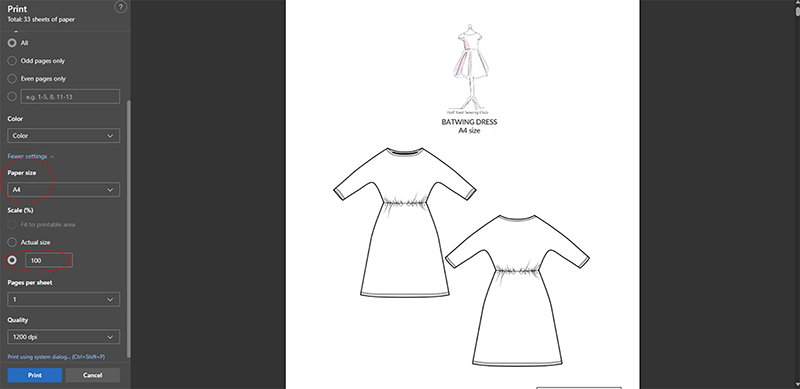
- Once you've printed out page 1, grab a ruler and make sure the test square is to scale/the correct size. If all is well, print off the rest of the pattern using the same settings and you're good to sew!
I have a sewing question; who can I ask?
You can submit questions to Debbie for her to answer at her live streams by emailing your question to debbie@halfyardsewingclub.com
Alternatively, you can also post your question on the 'Ask a Member' page, and other Half Yard Sewing Club Members may be able to answer!
I want to show other members what I've made; how do I do that?
Members can now directly upload their pictures of projects within the project page, via the website. Simply go to the project you’ve made and follow the instructions listed in the side bar.
Every Friday we feature a member make on our Facebook and Instagram pages. To submit a project to be featured simply upload a picture to your own social media using #halfyardsewingclub and #membermakes and tag us @halfyardsewingclub. Alternatively, you can send us a direct message with an image of your make!
In addition, you can email us pictures of your creations at projects@halfyardsewingclub.com if you would like us to upload them!
Digital Magazine
How do I download the Half Yard Sewing Club E-zine?
The E-zine is hosted using a widget embedded into a blog post, this means it may look slightly different depending on the device you're using to access it.
If you're using a mobile phone or tablet you may need to resize the page via your internet browser or open the magazine in fullscreen mode using the  button.
To download the magazine:
- Click the menu
 button located beneath the magazine.
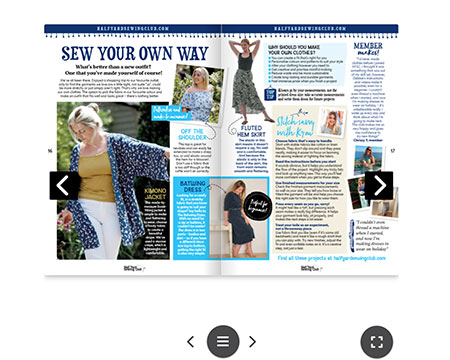
2. When the menu opens, select 'download' and choose a folder on your device where you would like to save your magazine.
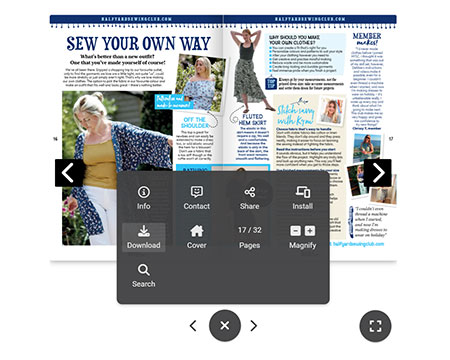
3. Exit, and locate the folder on your device where you have saved the magazine to read at your leisure!
Discounts and Offers
Where can I find the Discount Code for Debbie Shore Sewing?
www.debbieshoresewing.com is Debbie’s online store. Members of the Half Yard Sewing Club have access to an exclusive 10% discount on her store. To find the Discount Code visit the ‘About Me’ page.
Livestreams & Events
What is Debbie’s Calendar, and where can I find it?
Debbie’s monthly calendar let’s Members know where Debbie will be appearing online, on TV and in person each month, along with information regarding her live streams. Debbie’s calendar is posted on both the website's Facebook and Instagram page at the beginning of each month, or you can find it under the 'About Me' section on the website.
How do I access the member live streams?
Reminder emails for each live stream are sent to all those with emails switched on (you can check this in your account). This email also includes a link to visit when the scheduled time comes! (Don't forget to check your spam folder for HYSC emails).
- At the time of the live all you should need to do is be logged in to the Club and visit www.halfyardsewingclub.com/live (try bookmarking this page for easy access!)
- Nothing will be visible at the link until the time of the livestream except a holding or welcome image. Once there all you need to do is wait for Debbie to go live! You may need to refresh this page if you don’t see anything a few moments after the scheduled start time.
- You may see a Vimeo username and login section on the side/bottom of your screen. Just enter your HYSC username to start chatting!
- You do not need to have a Vimeo account or login to Vimeo.
We will put all the live stream videos up on the Half Yard Sewing Club blog up to 48 hours after they finish.
Redeeming Codes for Yearly Subscription (From Sewing Street etc.
I haven't received my code yet; what should I do?
Your code will be sent to you by the Half Yard Sewing Club up to 24 hours after your purchase. Your code will be contained in an email that also provides you with instructions on how to redeem it. Please ensure you check your junk!
If you still have not received your code after following the above, please email info@halfyardsewingclub.com
I'm NEW to the Half Yard Sewing Club, how do I redeem my subscription?
First, you will need to create an account at www.halfyardsewingclub.com/register. Note that nicknames must be unique – so if it doesn’t accept your choice, please try an alternative name.
When the subscribe box appears, close it and instead go to My Account
- If you are on a pc browser look on the right hand side for Account Management – if you are on a mobile device this is at the bottom
- Click on redeem a gift subscription
- Put your code in the box
- Press apply
- It will give you details about the code in green
- Click the redeem gift subscription button underneath to add the membership to your account.
I have a CANCELLED/REGISTERED account; how do I redeem my subscription?
Log in to your existing account at www.halfyardsewingclub.com/login (you won’t need to set up a new one).
When the subscribe box appears, close it and instead go to My Account
- If you are on a pc browser look on the right hand side for Account Management – if you are on a mobile device this is at the bottom
- Click on redeem a gift subscription
- Put your code in the box
- Press apply
- It will give you details about the code in green
- Click the redeem gift subscription button underneath to add the membership to your account.
I already have a PAID MONTHLY/ANNUAL subscription; how do I redeem my subscription?
If you have a code from Sewing Street and are an existing member simply:
- Log in to your account
- Go to My Account in the top right
- If you are on a pc browser look on the right hand side for Account Management – if you are on a mobile device this is at the bottom
- Click on redeem a gift subscription
- Put your code in the box
- Press apply
- It will give you details about the code in green
- Click the redeem gift subscription button underneath to add the membership to your account.
I'm already on a TRIAL/GIFT/RESELLER code membership, how do I redeem my subscription?
All codes should now stack and alter your renewal date. If you are on a reseller, purchase extra or trial code please follow the same instructions as all subscribed members here.
Do I need to cancel my subscription before using any membership codes?
If you have a paid annual subscription to the Half Yard Sewing Club, you will need to cancel your subscription.
Then when your current membership period ends you will be able to redeem your code. Your expiry date can be viewed in the ‘My Account’ section.
- When your membership has expired, you’ll be prompted to subscribe when you next log in.
- Select a subscription type, this is the subscription plan you will continue to once your code subscription expires. You can cancel before your code expires to avoid auto renewal.
- Enter your address details.
- Enter your gift code into the ‘Got a coupon code?’ box and click apply. It will show green when applied successfully.
- You will then have to enter your card details to allow a seamless transition to an automatic renewal once the code membership ends.
- You can cancel this before the code period ends and you won’t be charged.
You may receive monthly emails from our payment portal counting down the “balance” on your account. You will not be charged while on a code membership.
I have tried to redeem my code, but I have been charged for a monthly/yearly subscription; what should I do?
If you have attempted to redeem your code but have been charged for a subscription your code was not applied.
- To apply your code, log in and go to www.halfyardsewingclub.com/account/apply-gift in the ‘My Account’ section.
- Enter your code into the box and click ‘Apply’. The code should then appear in green.
- Then select ‘Redeem gift membership’ and your code will be fully applied.
- To receive a refund for the accidental payment, contact info@halfyardsewingclub.com
I have completed my subscription, but the page is stuck on the 'please wait' screen; what should I do?
Occasionally, due to the volume of subscriptions, the subscription page may get stuck or ‘hang’ on the ‘please wait’ screen once you have submitted your details.
- If this happens wait a few moments before exiting the page.
- Navigate to www.halfyardsewingclub.com and log in.
- Visit ‘My Account’ and check for a gift subscription notice on the right-hand side of the screen. If the code has been applied successfully, the duration and expiry date should be visible.
- If no gift subscription information is visible, please contact us at info@halfyardsewingclub.com
Purchase Extras (AKA Loyalty codes)
How do I access a purchase extra/loyalty discount?
Purchase extras are only occaisionally available for a limited time. When available these codes an optional add-on of 365 days (or another specified amount) of membership for a one-off payment. This can be applied on either annual or monthly memberships. When available, use the below steps to redeem your code:
- Log in to your HYSC account.
- Either use the link in your email or go to my account
- Select Purchase Extra in the Account Management section
- Enter the coupon code
- Enter your billing details
- Choose Purchase
- 365 days (or another specified amount) will be added to your existing membership period.
Can I switch from monthly to annual membership using the loyalty code?
There is no need to switch membership types – the code simply adds the specified amount of days access to your account and moves your renewal date on.
If you do wish to change membership types please follow the instructions below:
To switch from monthly to annual (or vice versa):
- Log into your account.
- Go to subscription settings.
- Select the new membership plan.
Please note that if you update from monthly to annual you are charged a pro-rata fee to upgrade.
What happens if I use the add-on before my current membership expires?
You won’t lose your remaining membership time. When you use the add-on code your updated membership period will begin automatically when your current subscription period ends, so your remaining time is preserved.
If your account appears to show an earlier end date than expected, please contact support and we’ll check this for you.
My membership end date looks incorrect after renewing.
In most cases this is simply a display issue while the system updates your renewal.
If your expiry date looks wrong, please send our support team:
- The email linked to your account
- A screenshot of the membership expiry date.
We’ll check our system and correct it if needed.
Can I purchase more than one purchase extra?
Each purchase extra is a single purchase code – you can only apply it one time to an account.
Do I need to cancel my subscription before using any membership codes?
No – the codes simply add time to your membership – once the time on them runs out then it will renew on your previous plan.
I’ve been charged unexpectedly. What should I do?
Occasionally a charge can occur if:
- A previous subscription renewal processed automatically
- A new membership was purchased while an existing one was still active
If you believe you’ve been charged incorrectly, please contact support with:
- The email address linked to your membership
- The date and amount of the charge
We will resolve it as quickly as possible for you.
Troubleshooting
I haven’t received my newsletter! What do I do?
As a paying member of the Half Yard Sewing Club, you should receive two newsletters a month; one at the beginning of the month and one near the middle of the month.
- If you haven’t received your newsletter, you can update which emails you receive from us by accessing ‘My Account’ and scrolling to the bottom of the page.
- Tick the box that reads ‘Receive newsletter and HYSC emails’
- Select ‘Update my details’.
If you have already selected to receive the newsletters but you still have not received any, make sure you check your junk folder. Sometimes email service providers may mark our emails as spam. To try and avoid this you can add us to something called a ‘Safe Senders List’. You can find out how to add our email address to your ‘Safe Senders List’ on Outlook here and via Gmail here.
Note: Stay vigilant when accessing your emails and be wary of any emails asking you for bank account details. We will never ask for your payment information via email.
Get in touch! If the answer to your query isn’t here, try contacting us via one of the emails below.
- info@halfyardsewingclub.com – Technical support
- projects@halfyardsewingclub.com – Member Make project photos
- debbie@halfyardsewingclub.com – Future project suggestions, competition entries and questions for Debbie’s live stream.
- If you have a question about your order from Debbie Shore Sewing please email enquiries@debbieshoresewing.com.
- If you have a query about an order of one of Debbie’s books, please contact sales@searchpress.com.